
Developer-Friendly Peppol Integration
The Peppox API lets you integrate Peppol e-invoicing in minutes, not weeks. Connect your ERP, accounting system or SaaS platform through one simple, unified REST API — no SOAP, no complexity.
Get API Access
With Peppox, you can administer all your clients from one secure, user-friendly interface.
Create a dedicated Company account for each client you manage and use the same simple API to send and receive their Peppol invoices and credit notes — without becoming or registering with an Access Point.
Example: if your ERP hosts multiple companies/clients, create a Peppox Company account for each one and connect our API to deliver and receive documents on their behalf.
Connect Your Way — Managed Access Point or Your Own
We make life easier for developers and integrators. If you don’t have a Peppol Access Point yet, start sending Peppol-compliant invoices today using the Peppox Managed Access Point — no complex onboarding.
Already have an Access Point? Simply link your credentials and certificates in our secure dashboard and you’re set. In both cases, you use the same Peppox API and endpoints — no code changes.
Bring Your Own Access Point
Keep your current provider and connect it in minutes — no rewrite, no migration headaches.
- Securely store credentials and certificates in the dashboard
- No code change — same endpoints and payloads
- Unified logs, delivery tracking, and error visibility
No Access Point Yet?
Use the Peppox Managed Access Point and send your first invoice in two clicks.
- No separate AP contracts or lengthy onboarding
- High-performance, secure routing to the Peppol network
- UBL / PEPPOL BIS validation and PDF attachment support
managed or linked in configuration — endpoints stay identical.
Switch Access Points anytime from the dashboard — keep your API calls the same, just update configuration.
Choose How You Want to Send Documents to Peppol
Peppox gives developers two powerful ways to integrate Peppol e-invoicing. You can either build documents by sending structured invoice data through our existing API endpoints, or use the new PDF2Peppol API to send documents faster from a simple PDF.
1. Structured Invoice API
This is the current developer workflow. Your application sends the invoice information manually: header, customer, supplier, lines, taxes, totals, attachments and then generates the Peppol XML.
- You control every invoice field
- You send structured JSON data
- You add invoice lines through dedicated endpoints
- You attach the PDF if needed
- You generate and send Peppol-compliant XML
2. PDF2Peppol API
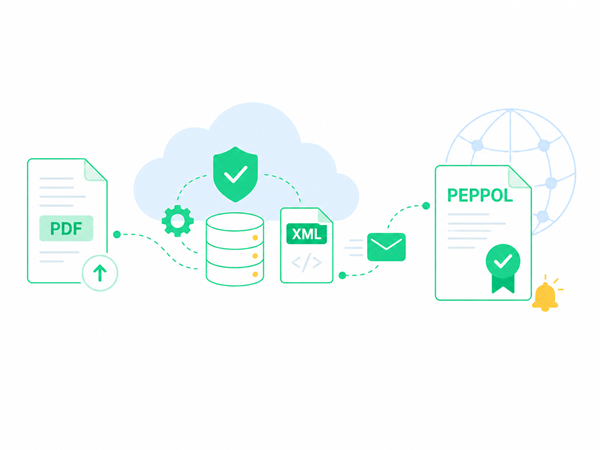
This is the fastest workflow. Your application sends a PDF invoice or credit note to Peppox. Peppox prepares the document data, your system checks it, confirms it, and sends it to Peppol.
- No manual XML generation
- No need to map every invoice field yourself
- Works for invoices and credit notes
- Verification step before sending
- Ideal when your software already generates PDFs
From PDF to Peppol in a Few API Calls
With PDF2Peppol, you do not need to rebuild your invoicing engine. If your ERP, SaaS platform or accounting tool already creates PDF invoices or credit notes, you can use Peppox to transform that document into a Peppol sending workflow.
Structured API for Full Developer Control
This API workflow is ideal when your application already has structured invoice data. You send JSON to Peppox — we handle XML validation, certificate authentication and Access Point routing automatically.
🔑 Secure Authentication
Connect with your API key — each request is scoped and encrypted for your account only.
📤 Invoice Endpoint
Send invoices using POST /v1/invoices/send — we deliver it to the correct Access Point.
📡 Webhooks
Receive asynchronous notifications for delivery confirmations, rejections or errors.
🧰 SDKs
Use ready-made SDKs for PHP, Python or Node.js — save days of development.
Example Request — Sending an Invoice
A simple example using cURL. Replace your credentials and Peppox will automatically validate and deliver the invoice to the correct Access Point.
curl -X POST https://api.peppox.com/v1/invoices/send \
  -H "Content-Type: application/json" \
  -H "Authorization: Bearer YOUR_API_KEY" \
  -d '{
    "access_point": "auto",
    "invoice": {
      "invoiceNumber": "INV-2025-1001",
      "issueDate": "2025-10-12",
      "currency": "EUR",
      "buyer": {
        "vat": "BE0123456789"
      },
      "seller": {
        "vat": "BE0987654321"
      },
      "lines": [
        {
          "description": "Software Development",
          "amount": 1250.00
        },
        {
          "description": "Support Services",
          "amount": 350.00
        }
      ],
      "attachments": [
        {
          "type": "pdf",
          "fileBase64": "JVBERi0xLjQKJeLjz9M..."
        }
      ]
    }
  }'
✅ The same call works with any Access Point — Peppox handles the routing.
API Endpoints Overview: Structured API and PDF2Peppol API
| Endpoint | Description | Method |
|---|---|---|
/v1/invoice/add |
Create a new invoice header and store supplier, customer, and payment details. | POST |
/v1/invoice_line/add/{id} |
Add one or multiple product or service lines to an existing invoice. | POST |
/v1/invoice_attach_pdf/add |
Attach a PDF document to an existing invoice using upload, Base64, or remote URL. | POST |
/v1/xml/generate |
Generate a Peppol-compliant UBL XML file combining the invoice, its lines, and attachments. | POST |
/v1/webhooks/register |
Register a webhook to receive delivery updates | POST |
| PDF2Peppol API — send documents faster from a PDF | ||
/pdf2peppol/add/ |
Upload a PDF invoice or credit note. Peppox prepares the document data for Peppol processing. | POST |
/pdf2peppol/check/ |
Check extracted and prepared document data before sending it to Peppol. | GET |
/pdf2peppol/confirm/ |
Confirm that the document data is correct and ready for Peppol delivery. | POST |
/pdf2peppol/send/ |
Send the confirmed invoice or credit note to the Peppol network. | POST |
 English
  French
  Spanish
  German
  Dutch
Dutch  Norwegian
  Danish
  Swedish